Saxenda tracker for iPhone: every daily shot, step-up and side effect in one place
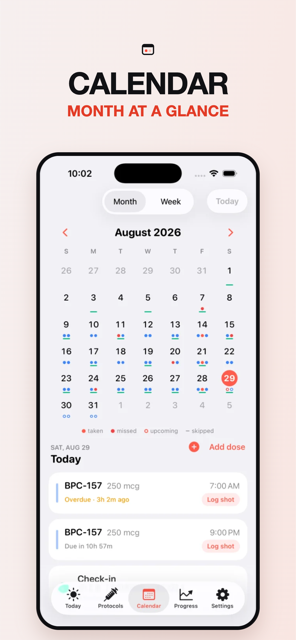
Tracking Saxenda means a shot every day rather than every week, a step-up each week for the first month, rotating sites often enough that they get reused quickly, and watching weight and nausea. Peppy counts down to the next daily shot, suggests the next site on a body map, advances the dose when each weekly step ends, and pairs a daily check-in with every shot.
What tracking Saxenda actually involves
A Saxenda tracker app has a different rhythm from the weekly GLP-1 trackers. Saxenda is a once-daily liraglutide pen, so instead of one event a week you have seven, and the questions change: did I already do today's, where did yesterday's go, and which step am I on this week. Saxenda's prescribing information lays the ladder out by week: 0.6 mg daily in week 1, 1.2 mg in week 2, 1.8 mg in week 3, 2.4 mg in week 4, and 3 mg from week 5 onward. The label also says the shot can be taken at any time of day without regard to meals, which makes a consistent time your choice rather than a rule. Victoza is the same molecule in a diabetes pen with a shorter ladder (0.6 mg for a week, then 1.2 mg, with 1.8 mg as a possible third step).
| Saxenda — catalog dose ladder | Dose |
|---|---|
| Step 1 | 0.6 mg |
| Step 2 | 1.2 mg |
| Step 3 | 1.8 mg |
| Step 4 | 2.4 mg |
| Step 5 | 3 mg |
Dose steps as listed in the Peppy catalog so the picker is fast — not a recommendation. Your prescriber sets your dose; Peppy tracks it.
That is the ladder as listed in the Peppy catalog for Saxenda. Your prescriber decides the pace; Peppy keeps the current step visible so the number on the card matches the pen.
Shot day, rotation and missed doses
With a daily shot, rotation matters more, not less: the same three regions (Saxenda's label names the abdomen, thigh and upper arm) get reused every few days. Peppy's body map breaks them into 13 sites and suggests the next one each time you open the log sheet, with "last used 4 days ago" under each. With 13 sites and a daily shot, every site comes back around roughly every two weeks. The injection site rotation guide explains the order and the custom-order option (Pro).
Saxenda's label is specific on missed doses: resume the once-daily regimen with the next scheduled dose and do not take an extra one; and if more than 3 days have elapsed since the last dose, reinitiate at 0.6 mg daily and follow the escalation schedule again. That second rule is why the tracker matters: the label's "more than 3 days" is a fact Peppy has, shown as elapsed time on the Today tab and as gaps on the Calendar month grid. Missed and overdue are computed from your schedule and log, never stored, so the calendar never shows duplicates. See the missed GLP-1 dose guide.
Titration and step-ups
Saxenda's steps are weekly rather than monthly, so the ladder is over in a month if you go straight up. Titration (Pro) in Peppy is a list of steps with durations: five steps of seven days each, or longer where your prescriber holds you. When a step ends the dose advances on the protocol card, the reminder text and the log sheet, and a marker lands on the weight chart. If you need to restart the ladder after a gap, edit the protocol's steps and last-dose date and the schedule recalculates. The titration schedule tracker guide walks through the editor.
Side effects and weight
The daily check-in matches Saxenda's daily rhythm. From the row on the Today tab you enter weight, score nausea, constipation, heartburn, sulfur burps and food noise from 1 to 5, rate how you feel, and add a note. Apple Health can supply the weight and every weigh-in you type is written back. Many people report nausea in the first days after each weekly step; with daily scores you can see whether it eases before the next step or not.
The Progress tab (Pro) draws the weight trend against your goal with a marker at each step, a side-effect heat-map by week and an adherence percentage, which with a daily shot is a genuinely useful number. Export (Pro) turns it into a PDF or CSV for your prescriber. The GLP-1 weight tracker guide covers the Health setup.
What's still active
Liraglutide's elimination half-life is approximately 13 hours according to Saxenda's prescribing information, which is why it is a daily shot. Peppy draws an "Active in your system" curve from that catalog half-life: it drops noticeably within a day and is rebuilt by each shot, so a skipped day shows as a clear dip. An estimate from the half-life, not a measurement.
Active in your system — Saxenda
estimate for daily doses, half-life 13 hAn estimate from the half-life, not a measurement. Individual clearance varies. Peppy shows this curve for each protocol under Active in your system.
How to do this in Peppy
- Open Protocols, tap + and search "Saxenda" (or "liraglutide"; Victoza is listed separately). Pen form, mg and daily frequency are prefilled.
- Enter your current dose and choose Daily with your usual time.
- Add the weekly steps under titration (Pro) so the dose advances on its own.
- Set the date and time of your last shot; the Today tab starts counting down to tomorrow's.
- Turn on the dose reminder and missed-dose nudge in Settings ▸ Reminders (Pro), and add the Streak or Next Shot widget if a daily habit helps you.
- Allow Apple Health so weight is already on the chart, then do your first check-in from the Today tab.
Each day: tap the shot on Today, tap the suggested site, log. Free covers one active protocol, logging, rotation, calendar, check-ins, streaks, Apple Health and iCloud. Always verify with your prescriber.

Track it in Peppy
123 compounds built in, the units math done for you, body-map site rotation and reminders — private on your iPhone.
 Free · iPhone · no account
Frequently asked
Is there a Saxenda tracker app for daily shots?
Yes. Peppy is a free iPhone Saxenda tracker app. Saxenda is in the catalog as a daily liraglutide pen with the 0.6 to 3 mg ladder, so you search for it, set your usual shot time and last dose, and log each shot on a body map. Victoza is in the catalog too.
How do I remember my daily Saxenda shot?
Set a daily schedule with your usual time and the Today tab shows the countdown. With Pro, Peppy sends a reminder at that time and a missed-dose nudge 30 minutes, 1 hour or 2 hours later, and the Next Shot widget logs it from your Lock Screen.
What if I miss a Saxenda dose?
Saxenda's label says to resume with the next scheduled dose and not take an extra one, and that if more than 3 days have passed the medication is reinitiated at 0.6 mg. Peppy shows how long it has been since your last logged shot so you and your prescriber have that number.
Can the app track my Saxenda step-ups?
Yes. Titration (Pro) stores each weekly step, 0.6, 1.2, 1.8, 2.4 and 3 mg, with a duration. When a step ends the dose advances on the card, the reminder and the log sheet, and a marker appears on your weight chart.
Does the tracker rotate injection sites for daily shots?
Yes. With a shot every day, sites come around fast. Peppy's 13-site body map suggests the next site and shows 'last used' under each one, so the same spot is not hit two days in a row.
Sources
Not medical advice. Peppy is a tracking tool, not medical advice. Dose calculations are mathematical conversions only. Always follow your prescriber's instructions and verify every draw-up yourself.