Zepbound tracker for iPhone: every shot, step-up and side effect in one place
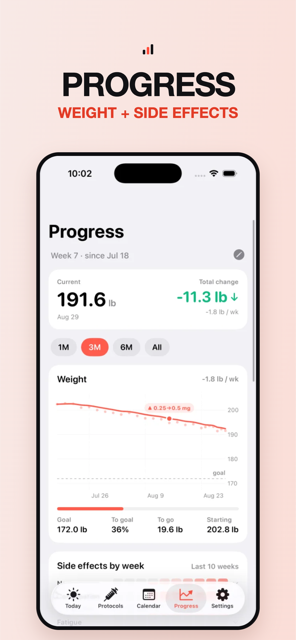
Tracking Zepbound means one weekly tirzepatide shot, a ladder that climbs in 2.5 mg steps toward a 5, 10 or 15 mg maintenance dose, rotating injection sites, and watching weight and nausea respond after each step. Peppy counts down to shot day, suggests the next site on a body map, advances the dose when a step ends, and pairs a daily weight and side-effect check-in with every shot.
What tracking Zepbound actually involves
A Zepbound tracker app is doing two jobs at once: a weekly shot reminder and a titration log. Zepbound is once-weekly tirzepatide in milligrams, the same molecule as Mounjaro, so there is no reconstitution and no units math. Its prescribing information starts at 2.5 mg once weekly for four weeks, then 5 mg, then increases in 2.5 mg increments after at least four weeks on the current dose. The label lists 5, 10 or 15 mg as maintenance doses for weight reduction (10 or 15 mg for obstructive sleep apnea) with a maximum of 15 mg. So the ladder has six rungs but most people stop on one of three, and the tracking question is "which rung, since when".
| Zepbound — catalog dose ladder | Dose |
|---|---|
| Step 1 | 2.5 mg |
| Step 2 | 5 mg |
| Step 3 | 7.5 mg |
| Step 4 | 10 mg |
| Step 5 | 12.5 mg |
| Step 6 | 15 mg |
Dose steps as listed in the Peppy catalog so the picker is fast — not a recommendation. Your prescriber sets your dose; Peppy tracks it.
That is the ladder as listed in the Peppy catalog for Zepbound. Your prescriber decides where you stop; Peppy only needs the current step so the right number is prefilled on shot day.
Shot day, rotation and missed doses
Zepbound's label says to inject in the abdomen or thigh, or the back of the upper arm if another person gives the shot, and to rotate sites with each dose. Peppy's body map has 13 sites across a front/back silhouette; open the log sheet and the next site is already marked with "last used" beneath it. If you track a second compound, the rotation is shared across both protocols. See the injection site rotation guide for the order.
The label's missed-dose window is 4 days: take the missed dose as soon as possible within 96 hours, otherwise skip it and take the next on the regular day. Changing your weekly day is allowed if two doses are at least 3 days (72 hours) apart. Peppy shows "OVERDUE" on the Today tab with the elapsed time, then lets you log late, skip, or add a past dose from the Calendar. The missed GLP-1 dose guide lays each label's rule out.
Titration and step-ups
Zepbound's 2.5 mg increments are small enough that it is genuinely easy to forget whether this is week three or week five on 7.5 mg. In Peppy, titration (Pro) is a list of steps with durations. The dose advances automatically when a step ends: the protocol card, the reminder text and the prefilled dose on the log sheet all update together, and a marker lands on the weight chart. If your prescriber extends a step, edit its duration and the rest shift. The titration schedule tracker guide shows the setup.
Side effects and weight
Weight is what most Zepbound users are watching, so Peppy puts it in the daily check-in rather than a separate app. Type it in, or let Apple Health supply it from a connected scale; every weigh-in you enter in Peppy is written back to Health. The same check-in scores nausea, constipation, heartburn, sulfur burps and food noise from 1 to 5, plus feelings and a note. Add other side effects from Settings if you need them.
The Progress tab (Pro) shows the weight trend against your goal with a marker at each step-up, a side-effect heat-map by week, a feelings chart and an adherence percentage. That is where "did the jump to 10 mg change anything" becomes a line you can read instead of a guess. The GLP-1 weight tracker guide covers the Health setup, and the nausea page covers what many people report in the days after a step-up.
What's still active
Zepbound's label puts tirzepatide's elimination half-life at approximately five to six days in people with overweight or obesity. Peppy uses the catalog half-life to draw an "Active in your system" curve that decays through the week and steps up with each shot. It is an estimate from the half-life, not a measurement, but it makes the weekly rhythm and any missed week visible at a glance.
Active in your system — Zepbound
estimate for weekly doses, half-life 120 hAn estimate from the half-life, not a measurement. Individual clearance varies. Peppy shows this curve for each protocol under Active in your system.
How to do this in Peppy
- Open Protocols, tap + and search "Zepbound" (or "tirzepatide"). Pen form, mg unit and weekly frequency are prefilled.
- Enter your current dose and choose Weekly with your shot day.
- Add the 2.5 mg steps and durations under titration (Pro). Stop the ladder at whatever maintenance dose your prescriber set.
- Set the date and time of your last shot so the Today countdown is right immediately.
- Turn on the dose reminder and the missed-dose nudge in Settings ▸ Reminders (Pro), and add the Next Shot or Weight widget to your Home Screen.
- Allow Apple Health so your weight history is already on the chart, then log your first check-in from the Today tab.
On shot day: tap the shot on Today, tap the suggested site, confirm the prefilled dose, log. Free covers one active protocol, logging, rotation, calendar, check-ins, Apple Health and iCloud sync. Always verify with your prescriber.

Track it in Peppy
123 compounds built in, the units math done for you, body-map site rotation and reminders — private on your iPhone.
 Free · iPhone · no account
Frequently asked
Is there a Zepbound tracker app for iPhone?
Yes. Peppy is a free iPhone Zepbound tracker app. Zepbound is in the catalog as a weekly tirzepatide pen with its 2.5 to 15 mg ladder, so you search for it, set your shot day and last dose, and log each shot on a body map. The Today tab shows the countdown.
How do I remember my Zepbound day?
Set the weekday in the protocol and the Today tab counts down. With Pro, Peppy sends a reminder on the day plus a missed-dose nudge 30 minutes, 1 hour or 2 hours later, and the Next Shot widget on your Lock Screen logs it in one tap.
Can the app track my Zepbound titration?
Yes. Titration (Pro) stores each 2.5 mg step with a duration. When a step ends the dose advances on the card, the reminder and the log sheet, and a marker appears on your weight chart so you can see what each step did.
How do I track weight loss on Zepbound?
Enter your weight in the daily check-in or let Peppy read it from Apple Health. The Progress tab (Pro) draws the trend with your goal line and a marker at each step-up.
Does Zepbound come as a vial, and can I track that?
Zepbound's label describes single-dose pens, single-dose vials and a multi-dose KwikPen. Peppy tracks all of them as the same weekly mg protocol; if you draw from a vial with a syringe, note the volume in the log's note field.
Not medical advice. Peppy is a tracking tool, not medical advice. Dose calculations are mathematical conversions only. Always follow your prescriber's instructions and verify every draw-up yourself.