A private peptide tracker: no account, your data on your iPhone, synced only with your own iCloud
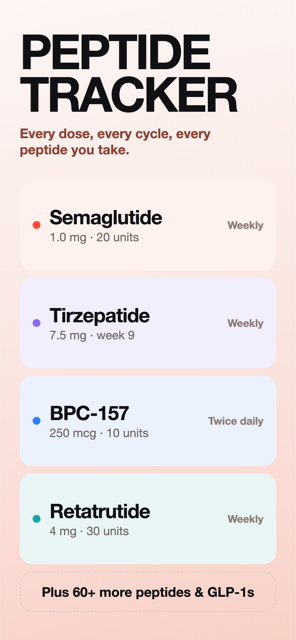
A private peptide tracker should need no account, keep logs on the device, sync only through storage you control, ask for Apple Health access per data type, and be honest about analytics. Peppy has no sign-up and no server of its own; data lives on your iPhone and syncs through your own iCloud. No health data leaves your device except to your iCloud, or to whoever you send an export.
What "private" should mean for a peptide tracker
A dose log is a medical record you wrote yourself. It says what you take, how much, how often, where on your body, what it did to your weight and how you felt about it. Whether the compound is Wegovy from a pharmacy or a research peptide, that is not information most people want in a stranger's database. A private peptide tracker should meet five tests, and you should be able to check each one rather than take the word "private" on trust:
- No account, so there is no identity to attach the log to.
- Data stored on the device, not on the developer's server.
- Sync, if any, through storage you already own and can switch off.
- Health permissions that are explicit, narrow and revocable.
- A plain description of what analytics sees, and what it does not.
Here is how Peppy meets each one. The full legal version is the privacy policy.
No account
Peppy has no sign-up. You open it, pick a compound and set a schedule. There is no email, no password and no profile, and nothing in the app identifies you to the developer. Peppy Pro is an ordinary App Store subscription, so the purchase is handled by Apple under your Apple ID; Peppy learns that an entitlement is active and nothing else. Restore on a new phone works the same way, through the App Store.
Your data lives on your iPhone
Every protocol, dose, check-in, weigh-in, note and progress photo is stored in a database on the phone. Peppy runs no server that holds user data, which means there is nothing to breach and nothing to subpoena on the developer's side. The app line is "Lives on your iPhone, synced with your iCloud", and the second half is the only place the data goes.
iCloud sync mirrors that database into the private area of your own iCloud account, the same mechanism Apple's own apps use. It is what makes a new phone or a reinstall pick up where you left off. It is free for everyone, and it is a switch: Settings ▸ Data ▸ iCloud sync shows On or Off. Turn it off and the data stays purely local. Progress photos (Pro) follow the same rule, on-device and iCloud only. This is the main difference from a spreadsheet in Google Sheets, where the log sits on someone else's server by default. If your Apple ID has Advanced Data Protection turned on, that applies to Peppy's iCloud data as well, since it is your iCloud, not a third-party service.
The one way health data leaves the phone otherwise is on purpose: the PDF or CSV export for your doctor is built on the device and goes only to the app or person you pick in the share sheet.
Apple Health, explained
Peppy can read your weight history from Apple Health and write each weigh-in back, so your scale app and your dose log agree (see the weight tracker guide). This is optional and off until you turn on Sync weight with Apple Health. When you do, iOS shows Apple's permission sheet, where read and write are separate switches and each data type is listed individually. Peppy requests body weight only. It does not ask for steps, heart rate, sleep, glucose or anything else, and it does not read data while the phone is locked, because Apple does not allow it.
You can see and change what Peppy has at any time under Settings ▸ Health ▸ Data Access & Devices; revoke it and Peppy loses access immediately. Apple's developer rules prohibit using Health data for advertising or selling it to data brokers, and require a privacy policy that says how it is used. Health data never goes to Peppy's analytics.
What analytics sees, and what it does not
Peppy is built by one developer, and usage analytics is how an indie app finds out which screen confuses people and which feature nobody opens. Being precise about it matters more than pretending it is not there. Peppy sends anonymous usage events to an analytics service the developer runs: which screen was opened, that a protocol was created and for which catalog compound, that a dose was logged and whether it was on time, that a check-in was completed, that an export was made, whether Pro is active, the app version and locale.
What those events do not contain: your weight, your side-effect scores, your feelings, your notes, your injection sites, your photos, the contents of an export, or your name, email or Apple ID, because Peppy never has those last three. The doses and dates themselves stay in the database on your phone. In one line: no health data leaves your device except to your iCloud, and to whoever you choose to share an export with.
Deleting everything
Settings ▸ Data ▸ Delete all data wipes every protocol, log, check-in and photo from the phone and, if sync is on, from your iCloud copy. Deleting the app removes the local database. Weight you wrote to Apple Health stays in Health, because it is yours and other apps may rely on it; delete it there if you want it gone.
How to do this in Peppy
- Install Peppy and add a protocol. Notice there is no sign-up step; the Today tab appears straight after onboarding.
- Open the Settings tab and look under Data. iCloud sync shows On or Off; switch it off if you want the log to exist only on this phone.
- Under Tracking, leave Sync weight with Apple Health off, or turn it on and review Apple's permission sheet: read and write are separate, and only body weight is requested.
- Check what you granted any time in iOS Settings ▸ Health ▸ Data Access & Devices ▸ Peppy.
- Read the Privacy policy and Medical disclaimer from the Support section of Settings.
- If you ever want out, tap Delete all data under Data, then delete the app.

Track it in Peppy
123 compounds built in, the units math done for you, body-map site rotation and reminders — private on your iPhone.
 Free · iPhone · no account
Frequently asked
Does Peppy require an account?
No. There is no sign-up, no email and no password. Open the app and add a protocol. Peppy Pro is an App Store subscription, so payment goes through Apple and Peppy never sees your card.
Where is my data stored?
In a database on your iPhone. If iCloud sync is on, it is mirrored to the private part of your own iCloud account so a new phone picks it up. Peppy has no server of its own that holds your logs.
What does Peppy send to analytics?
Usage counts so an indie developer can see what to improve: which screens are opened, that a protocol was created for a given compound, that a dose was logged on time, that a check-in was completed. Not your weights, side-effect scores, sites, notes, photos or exports. You can read the full list in the privacy policy.
Is a private peptide tracker safe to use with Apple Health?
Apple Health permissions are granted per data type and separately for reading and writing, and you can revoke them under Settings ▸ Health ▸ Data Access & Devices. Peppy asks only for body weight. Apple's rules forbid apps from using Health data for advertising.
Can I delete everything?
Yes. Settings ▸ Data ▸ Delete all data removes every protocol, log, check-in and photo from the device and from your iCloud copy. Deleting the app does the same for the local copy.
Sources
Not medical advice. Peppy is a tracking tool, not medical advice. Dose calculations are mathematical conversions only. Always follow your prescriber's instructions and verify every draw-up yourself.