Dose log export for your doctor: a clean PDF or CSV of what you actually took
To export a dose log for your doctor, open Settings ▸ Export for your doctor in Peppy, pick a date range (30 days, 90 days, 1 year or all time), choose what to include (doses, weight, check-ins, side effects, notes) and tap PDF report or CSV files. The file is built on your iPhone and goes only where you send it with the share sheet. Export is Pro.
Why a dose log export is worth the two minutes
"How has it been going?" is the first question at a GLP-1 or peptide follow-up, and "fine, I think" is the answer most people give. What your prescriber actually wants is specific: which doses you took and when, which ones you missed or skipped, what your weight did, and which side effects showed up around which doses. That is exactly what a tracker has been collecting for weeks. A dose log export turns it into something you can hand over in the first two minutes of the appointment instead of reconstructing it from memory. It also answers the question you may have been avoiding: was the plateau in month two a dose problem, a missed-shots problem, or neither?
Peppy's version is called Export for your doctor and it is a Pro feature. The screen describes itself as "a clean summary of your protocols, doses, weight and check-ins", and that is the whole scope.
What is in the report
The export screen has two controls: a date range and an Include list.
- Date range: 30 days, 90 days, 1 year or All time. Match it to the appointment, for example 90 days for a quarterly check.
- Protocols: always included. Each protocol's compound, dose, units, schedule and any dose step-ups, so the reader knows what the log refers to.
- Doses: every log in the range with date, time, dose, units, injection site and whether it was taken or skipped. Because Peppy computes missed doses from the schedule rather than storing them, the report shows the gaps honestly; see missed doses.
- Weight: every weigh-in, including ones imported from Apple Health.
- Check-ins: the daily side-effect and feeling scores on their 1 to 5 scale.
- Side effects: the side-effect entries broken out on their own, which is what makes "nausea the two days after each step-up" visible on paper.
- Notes: off by default. Your check-in and dose notes are yours; include them only if they would help.
Pick at least one thing to include; if the range has nothing in it, Peppy says "Nothing to export for that range" rather than producing an empty file.
PDF report or CSV files
The PDF report is a multipage document meant to be read: protocol summary first, then the dose log, weight and check-ins, each as a table. It is the one to bring to an appointment or upload to a patient portal. The CSV files option produces plain spreadsheets of doses and check-ins. Use it when you want to do your own charting, keep a backup outside iCloud, or hand data to someone who will import it into their own system. Both come from the same logs, so the numbers match.
What the report is not: it is not an assessment. There is no verdict on adherence, no comment on dose, no advice. It reports what you logged and leaves the interpretation to the person you are showing it to. If you run several protocols (see the stack tracker guide), every one of them is in the same report, each labelled with its compound and units, so a prescriber sees the whole picture rather than one compound at a time.
It never leaves your phone unless you send it
The export is built on your iPhone. Peppy has no server and no account, so there is nowhere for the file to go by itself. The footnote on the export screen puts it directly: reports contain exactly what you logged; share them with your care team; Peppy never sends them anywhere itself. After you tap PDF report or CSV files, the iOS share sheet opens and you choose the destination: AirDrop to a laptop, Mail, Messages, Save to Files, a patient-portal app, or Print. Whatever you do not choose does not happen. The privacy guide covers where the underlying data lives.
Two practical notes. If your clinic uses a portal, saving the PDF to Files first makes the upload straightforward. If you send it by email, remember that email is only as private as the inboxes on both ends.
A five-minute routine before the appointment
- Do today's check-in first so the last weigh-in and side-effect scores are in the range.
- Open the Calendar tab and scan the range for a dose you took but forgot to log. Add it as a past dose so the report is accurate rather than pessimistic.
- Export the PDF for the range since your last visit. Skim it once yourself; the side-effect table often surfaces a pattern (see tracking side effects) worth raising.
- Save it to Files and, if you like, AirDrop it to yourself so it is on a second device.
- Write down the two or three questions the report raised. That is what the appointment is for.
How to do this in Peppy
- Open the Settings tab (the fifth tab) and tap Export for your doctor under Data. Export is Pro; if you are on the free tier, this opens the paywall.
- Under Date range, pick 30 days, 90 days, 1 year or All time.
- Under Include, switch on Doses, Weight, Check-ins and Side effects. Leave Notes off unless you want them in.
- Tap PDF report for a readable document or CSV files for spreadsheets. Peppy builds the file on your iPhone.
- In the share sheet that opens, pick Save to Files, AirDrop, Mail, Print or your portal app. Nothing is sent until you choose.
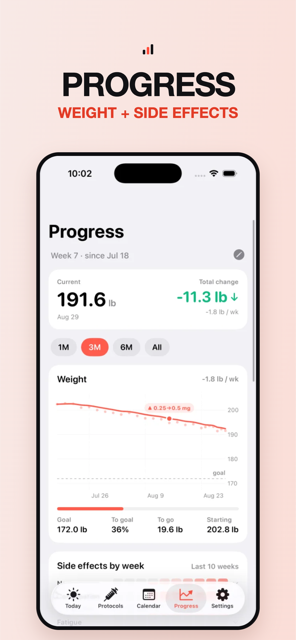
- Before the next visit, repeat with the range since the last export. The weight chart in Progress and the report use the same weigh-ins, so the two will agree.

Track it in Peppy
123 compounds built in, the units math done for you, body-map site rotation and reminders — private on your iPhone.
 Free · iPhone · no account
Frequently asked
How do I export my injection log for my doctor?
In Peppy, go to Settings ▸ Export for your doctor (Pro), pick a range and what to include, then tap PDF report. Share it with AirDrop, Mail, Messages, a patient portal upload or Files, or print it from the share sheet.
What is included in Peppy's dose log export?
A summary of your protocols, then every dose (taken and skipped, with date, time, dose, units and injection site), your weigh-ins, and your daily check-ins with side-effect and feeling scores. Notes are optional, so you can leave private comments out.
Should I export a PDF or a CSV?
PDF for a person: it is a readable multipage report your prescriber can skim in a minute. CSV for a system: separate files of doses and check-ins that open in Numbers, Excel or a spreadsheet, useful if you want to chart something yourself or keep a backup.
Does Peppy upload my report anywhere?
No. The report is generated on your iPhone. Peppy never sends it anywhere itself; it only goes to the app or person you choose in the iOS share sheet.
Can I export just the last few weeks?
Yes. The date range picker offers 30 days, 90 days, 1 year and All time. Pick the range that matches your appointment, for example 90 days for a quarterly review.
Not medical advice. Peppy is a tracking tool, not medical advice. Dose calculations are mathematical conversions only. Always follow your prescriber's instructions and verify every draw-up yourself.