Peptide cycle tracker: what "5 on, 2 off" means as a schedule, and how to keep it straight
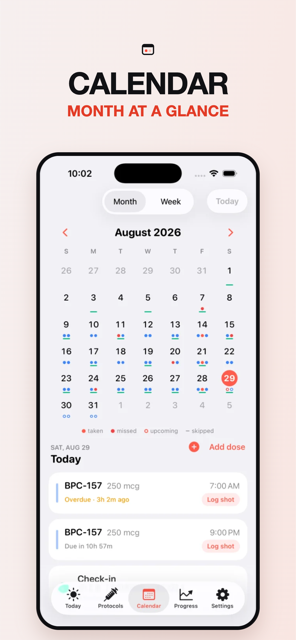
A peptide cycle is a repeating pattern of on days and off days: 5 on / 2 off means dose Monday to Friday and rest at the weekend; 4 weeks on / 2 off means a month of doses then a fortnight without. A cycle tracker's job is to know which day today is, to not remind you on off days, and to not count them as missed. Peppy's cycle presets (Pro) do that automatically.
What a peptide cycle is, as a schedule
A peptide cycle tracker is really a calendar with an opinion about which days count. People on research compounds such as BPC-157, CJC-1295 / Ipamorelin or MOTS-c often describe their schedule in cycle shorthand, and the shorthand hides a lot of rules:
- 5 on / 2 off: dose five consecutive days, rest two. Usually weekdays on, weekend off, repeating every week.
- Every other day (EOD): a two-day cycle, one on and one off, which drifts across weekdays.
- 4 weeks on / 2 off, 8 on / 4 off, and so on: a block of dose days at the normal frequency, then a block of nothing, then repeat.
- A single run: "6 weeks, then stop" is a cycle with no repeat.
Why people cycle, and whether a given compound should be cycled, is outside what this page (or Peppy) will tell you. Those are questions for whoever oversees your protocol, and the honest answer for many research compounds is that the evidence is thin either way. What this page covers is the scheduling: once you have decided on a pattern, how do you keep it straight for eight weeks without a gap, a double or a phantom missed dose?
Why cycles break trackers
Most reminder apps and spreadsheets model a schedule as "every day at 8 am" or "Mondays and Thursdays". A cycle adds a second clock on top: where you are in the on/off pattern. Three things go wrong when the tracker does not know about it.
- Off-day reminders. The app pings you on Saturday. You dismiss it. By week three you dismiss the Tuesday one too.
- Phantom missed doses. A blank Sunday looks like a skipped shot. Your adherence number drops for doing exactly what you planned, and the calendar becomes something you stop trusting.
- Losing your place. In a 4-on / 2-off block, is this week 3 or week 4? If you took a week off for travel, does the block restart? Without a start date and a rule, nobody remembers.
The fix is to make the cycle part of the schedule itself, so that "due today" already accounts for it. Then the reminder only fires on on days, an off day is displayed as an off day, and "missed" is computed only where a dose was expected. That is how Peppy's schedule engine works: your log holds only what you did (taken or skipped), and everything else, including "this is a rest day", is derived from the protocol's rules each time the calendar is drawn.
Cycles and the rest of your protocol
A cycle interacts with a few other things worth tracking:
- Inventory. A 5 on / 2 off schedule uses 5 doses a week, not 7. The run-out date for a vial has to know that. See the vial inventory guide.
- Site rotation. Off days are not rotation steps. The next site should be the next one in order, not "whatever the rotation would have been on Sunday". More in injection site rotation.
- Half-life. Short-half-life compounds like BPC-157 (4 hours in the catalog) effectively clear on every off day; the active-level curve shows the weekend gap as a flat line at zero, which many people find is the clearest way to picture what a break does.
- Stacks. Two compounds on two different cycles is where a shared Today list earns its keep. See peptide stack tracker.
How the calendar shows it
In Peppy, the month grid in the Calendar tab uses one dot per protocol per day, in that protocol's color: filled for taken, hollow for upcoming, a marker for skipped, and a distinct marker for missed. Off days in a cycle have no dot at all for that protocol; they are rest days, not gaps. The week strip at the top mirrors the same thing for the current week, so a glance on Saturday morning confirms "nothing due" without opening a protocol. Because missed status is computed, a cycle you edit retroactively (say you decide last week's break started on Thursday, not Monday) redraws the calendar to match, with no duplicate or orphaned entries.
How to do this in Peppy
Cycles are a Pro feature. Everything else in these steps, including the calendar, is free.
- Open Protocols, tap + and pick the compound from the catalog. Set the base frequency first: daily, every other day, twice a week, or specific weekdays. This is the pattern inside the on block.
- Turn on Cycle (Pro) in the editor. Choose a preset, 5 on / 2 off or 4 weeks on / 2 off, or set your own on and off lengths in days or weeks. Pick the start date; today is the default, but you can set it to the day the current block actually began so Peppy knows where you are.
- Save. The protocol card on Today now shows the current phase ("On · day 3 of 5" or "Off until Mon 8 Sep"), and the card disappears from the Today list on off days. Reminders (Pro) do not fire on off days.
- Open Calendar. Off days show no dot for that protocol; on days show upcoming dots that fill in as you log. If you dose on an off day anyway, log it from Calendar with Add a past dose and it is recorded as taken with no change to the cycle.
- To take an unplanned break, tap Pause on the protocol. Paused days are neither on nor off, so they do not count against adherence. Resume when you are back, and the cycle continues from where you left it or restarts the block, whichever you choose. If a cycle is finished for good, Archive keeps the history without the card.
Peppy keeps the pattern you chose accurate on the calendar. Whether to cycle, and for how long, is your call and your overseeing professional's, not the app's.

Track it in Peppy
123 compounds built in, the units math done for you, body-map site rotation and reminders — private on your iPhone.
 Free · iPhone · no account
Frequently asked
What does 5 on 2 off mean for peptides?
It is a weekly pattern: five consecutive dose days followed by two rest days, usually lining up with weekdays and the weekend. It is a scheduling convention people use for daily research compounds; whether to cycle at all, and how, is between you and whoever oversees your protocol.
How do I track a peptide cycle on a calendar?
Mark the on days and the off days differently so a blank off day never looks like a missed dose. Peppy does this for you: off days are shown as rest days on the month grid and are excluded from reminders, missed status and adherence.
Can I run two peptides on different cycles?
Yes. In Peppy each protocol has its own cycle, so BPC-157 on 5 on / 2 off and TB-500 twice a week with a 6-weeks-on / 4-off block run side by side, and the Today tab only lists what is due today. Unlimited protocols and cycles are Pro.
What happens when a cycle ends?
That depends on how you set it. A 5 on / 2 off preset repeats every week until you pause or archive the protocol. A weeks-on / weeks-off block repeats too, and Peppy shows the next on and off dates on the protocol card so you know when the break starts and ends.
Does a cycle tracker tell me how long to cycle BPC-157?
No. Peppy records the cycle you enter and keeps the calendar accurate; it does not recommend a length, a dose or a break. The catalog lists common doses and typical frequency for information only.
Not medical advice. Peppy is a tracking tool, not medical advice. Dose calculations are mathematical conversions only. Always follow your prescriber's instructions and verify every draw-up yourself.