A weekly injection reminder that follows up if you don't log the shot
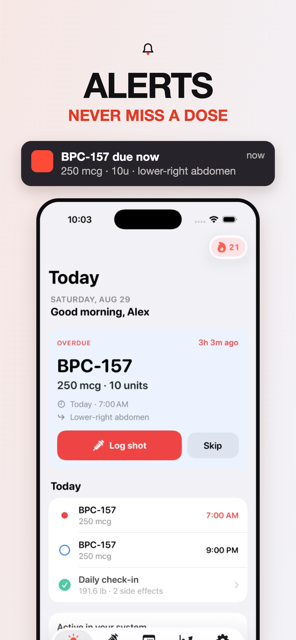
A good weekly injection reminder fires on shot day at your time, follows up if you have not logged the shot, lets you log from the notification, and stays visible on the Lock Screen until it is done. Peppy does all four (Pro): a per-protocol reminder, a 30 min / 1 h / 2 h nudge, a "Log it" action, and a Next Shot widget with a one-tap Log button.
What a weekly injection reminder has to do
A once-weekly shot is easy to remember for the first month and easy to forget after that. The day drifts. You are out of the house at the usual time. The phone buzzes, you swipe it away, and by evening you are not sure whether you took it. A weekly injection reminder that only rings once solves the first problem and none of the others. The one you want does four things: it fires on shot day at your time, it comes back if you have not logged the shot, it lets you log from the notification itself, and it stays visible on the Lock Screen until the shot is done.
This applies to the weekly GLP-1s (Ozempic, Wegovy, Mounjaro, Zepbound and compounded semaglutide or tirzepatide are all labelled once weekly) and equally to weekly research compounds such as TB-500. Peppy's reminders are Pro; here is how each piece works.
The shot-day reminder
Reminders in Peppy are set per protocol, not globally, because a weekly shot and a daily one need different times. In the protocol editor, under Reminders, turn on Remind me and the reminder attaches to the protocol's schedule: every Tuesday at 8:00 AM, say. If the protocol has dose step-ups (Pro), the reminder text updates to the current dose automatically when a step ends, so the notification says what to draw today, not what you drew last month. During onboarding Peppy asks the same thing in one line, "Want a nudge on Tuesday day?", and you can change it any time.
If notifications are off for Peppy at the system level, the editor says so ("Notifications are off for Peppy in iOS Settings") and links you there. Nothing is delivered until you allow it.
The missed nudge
This is the piece most reminder apps skip. Each protocol's reminder has four modes: On time only, On time + 30 min nudge, On time + 1 hr nudge and On time + 2 hr nudge. The nudge only comes if you have not logged the shot yet. Log it at 8:05 and the 8:30 nudge never fires. Ignore the first notification and the second one arrives, with the same Log it action. Pick the gap that matches how you actually miss shots: 30 minutes if you tend to get distracted mid-routine, 2 hours if the problem is being away from the fridge.
Underneath, Peppy does not store a "missed" flag. Missed, overdue and upcoming are computed from the schedule and the logs, so the moment you log the shot, even hours late or from the calendar the next day, the nudge, the OVERDUE state and the missed dot all resolve at once. The missed dose guide covers what the labels say about late doses; Peppy's job is to make sure you know it happened.
"Log it" from the notification
Every dose notification carries two actions: Log it, which records the dose as taken right now, and Remind me in 1h. Logging from the notification takes one press, so the shot gets recorded at the moment it happens rather than "later", which is when logs go missing. It records the time and the dose; open the app afterwards if you want to tap the site on the body map or add a note, and Peppy lets you edit the log in place.
Widgets: the reminder that does not go away
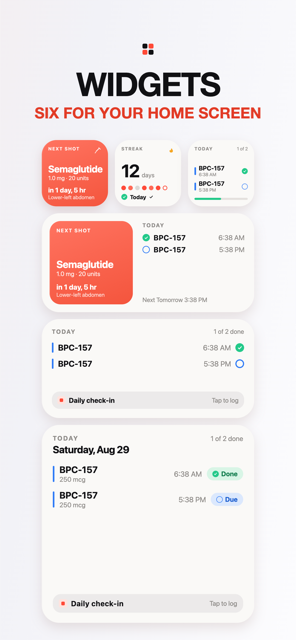
A notification is gone once it is swiped. A widget is still there. Peppy has four (Pro), for the Home Screen and the Lock Screen:
- Next Shot: the next dose, a countdown ("in 2d 4h", "in 35m"), and a one-tap Log button. When the time passes without a log it reads Overdue.
- Today: everything due today, what is done ("2 of 3 done"), and your check-in.
- Streak: your day streak and whether today is already logged.
- Weight: your latest weigh-in and how it moved over 30 days.
The Lock Screen versions are the ones to use for a weekly shot: a small "Ozempic · in 6h" next to the clock is a reminder you read twenty times a day without meaning to. Tapping Log on the widget logs the dose without opening the app.
The other reminders
Three more reminders live alongside the dose one. A daily check-in reminder (Settings ▸ Reminders, with its own time) prompts the weight and side-effect check-in that gives the Progress charts their data. A refill reminder, set per protocol, fires before the last dose in your inventory. A weekly photo reminder prompts a progress photo. All are Pro, all are optional, and each has its own switch.
How to do this in Peppy
- Open the Protocols tab, tap your protocol, then Edit. If you have not added one yet, tap + and choose the compound (for example Ozempic or Compounded Tirzepatide) from the catalog.
- Set the schedule to weekly on your shot day and time. This time is what the reminder uses.
- Scroll to Reminders, turn on Remind me, and pick On time + 1 hr nudge (or 30 min / 2 hr). Allow notifications if iOS asks. Save.
- Long-press the Home Screen, tap +, search Peppy, and add the Next Shot widget. Do the same on the Lock Screen (long-press the Lock Screen, Customize, add a widget).
- On shot day, either press Log it on the notification, tap Log on the widget, or open the Today tab and tap the dose to log it with the body map site.
- If you miss it, the Today hero and the widget show OVERDUE. Log it when you take it; if you decide with your prescriber to skip, tap Skip and it stays in your history as skipped.
Track it in Peppy
123 compounds built in, the units math done for you, body-map site rotation and reminders — private on your iPhone.
 Free · iPhone · no account
Frequently asked
What is the best way to remember a weekly injection?
Pick a fixed day and time, put a reminder on it, and make the reminder follow up if you have not logged the shot. Many people report that a single alarm gets dismissed; a nudge 30 minutes or an hour later plus a widget that shows OVERDUE is what actually gets the shot done.
Does Peppy remind me if I forget my Ozempic or Mounjaro shot?
Yes (Pro). Set the reminder on the protocol to "On time + 30 min nudge", "+ 1 hr" or "+ 2 hr". The nudge only comes if you have not logged the shot yet, and the Today tab and Next Shot widget show OVERDUE until you do.
Can I log the shot from the notification?
Yes. Peppy's dose notification has a "Log it" action that records the dose as taken right now, and a "Remind me in 1h" snooze. You can open the app afterwards to add the injection site.
Is there a weekly injection reminder widget for the Lock Screen?
Yes (Pro). The Next Shot widget shows the next dose with a countdown and a one-tap Log button, on the Home Screen and the Lock Screen. Today, Streak and Weight widgets are also available.
Are reminders free in Peppy?
Reminders and widgets are part of Peppy Pro. Logging, the calendar, the countdown on the Today tab and the computed OVERDUE status are free, so you can still see what is due without notifications.
Not medical advice. Peppy is a tracking tool, not medical advice. Dose calculations are mathematical conversions only. Always follow your prescriber's instructions and verify every draw-up yourself.